Filling In the Energy Balance Control Tab
The Control tab contains the settings that control the behavior of the Energy Balance analysis rule. This includes the following:
- Calculations to perform and unit of measure options.
- Solution Convergence Parameters.
- Calculation output and diagnostic options.
- Gross Error checking configuration.
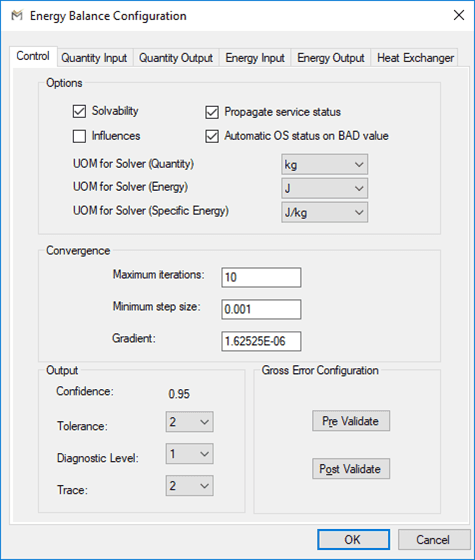
Control Tab
| Parameter | Description |
|---|---|
| Solvability | Select for Sigmafine to do a solvability analysis and report the solvability for the flows, transfers, and inventories. |
| Influences | Select to calculate the impact that each flow, inventory, and transfer measurement has on the final reconciled solution. |
| Propagate Service Status | Select for Sigmafine to set balance type elements to out of service if all connected elements are also set to out of service or set all connected elements out of service if balance point is out of service. |
| Auto OS Status on BAD Value | All plug-ins have been enhanced for supporting this flag. By flagging this option (default), upon the first “Bad-Input” over an Element the Element is set automatically “OS”. In Case this option is not flagged, then elements are not marked as “OS” automatically. Is up to the user mark those elements as “OS”. |
| UOM for Solver: Quantity / Energy / Specific Energy | Select the appropriate unit of measure for each of: the measurement quantity (Quantity), the total energy (Energy), and the specific energy (Specific Energy). |
| Maximum Iterations | Applicable to non-linear balances. Specify the highest number of iterations to be performed for the convergence. The default is 10, but most solutions can be solved within five iterations. |
| Minimum Step Size | Specify the minimum step size for the convergence. The default is 0.0001. Step size is expressed in relation to tolerance. A problem is considered solved if the step size is smaller than the value specified here. For example, if you specify a minimum step size of 0.001, the balance is considered to have converged if the step size is less than 0.1% of the range expressed by the tolerance. |
| Gradient | Displays the initial rate of change of the convergence. Sigmafine chooses an initial gradient based on the minimum step size. This gradient also can be adjusted as the calculation occurs. For example, if a step is larger than the previous step, Sigmafine increases the steepness of the gradient to stabilize convergence. If a step is much smaller than the previous step, Sigmafine decreases the gradient to accelerate convergence |
| Confidence | Read-only field displays the confidence calculation, which is derived from the tolerance setting. Setting the tolerance to 2 means the confidence is 0.95, if the tolerance is set to 3 then the confidence is 0.99. |
| Tolerance | Select the number of standard deviations for which tolerance of the measurement is to be defined. |
| Diagnostic Level | 0: No diagnosis analysis.1: Auto-diagnosis. The two most severe measurement errors will be noted in the log file. Trace must also be set to 1. If Trace is set to 2, then details of all severe errors are listed in the log file.2: Auto-rejection. The most severe measurement errors will be marked as out of service; reconciliation calculation is performed again with the next measurement, with severe the error placed out of service. Process is repeated until the severity of the balance points is between –1 and 1, inclusive. |
| Trace | 0: No trace analysis.1: Details of the two most severe measurement errors are noted in the log file.2: Details of all measurement errors with a severity greater than the tolerance are noted in the log file. |
| Pre Validate / Post Validate | Gross Error Configuration – Use this optional feature to configure the Gross Error Detection Analysis Rule for mass or volume balances. This enables validation steps before and after the energy balance is done. The Pre-validate steps check the initial Model configuration and the collected input data for possible errors. The Post-Validate steps check the resultant data from the balance for further error. For complete information about the configuration of Gross Error Detection and a list of performed checks, see the Gross Error Analysis Rule Appendix. . |